The short version
The Google-GeminiNotebook fetcher is the user-triggered agent behind Google's Gemini Notebook (formerly NotebookLM). Because a human triggers each fetch, it never reads robots.txt. The only controls that reach it are server-layer rules, IP-range blocks, and the emerging Web Bot Auth protocol. Your access policy just moved from a text file to your infrastructure.
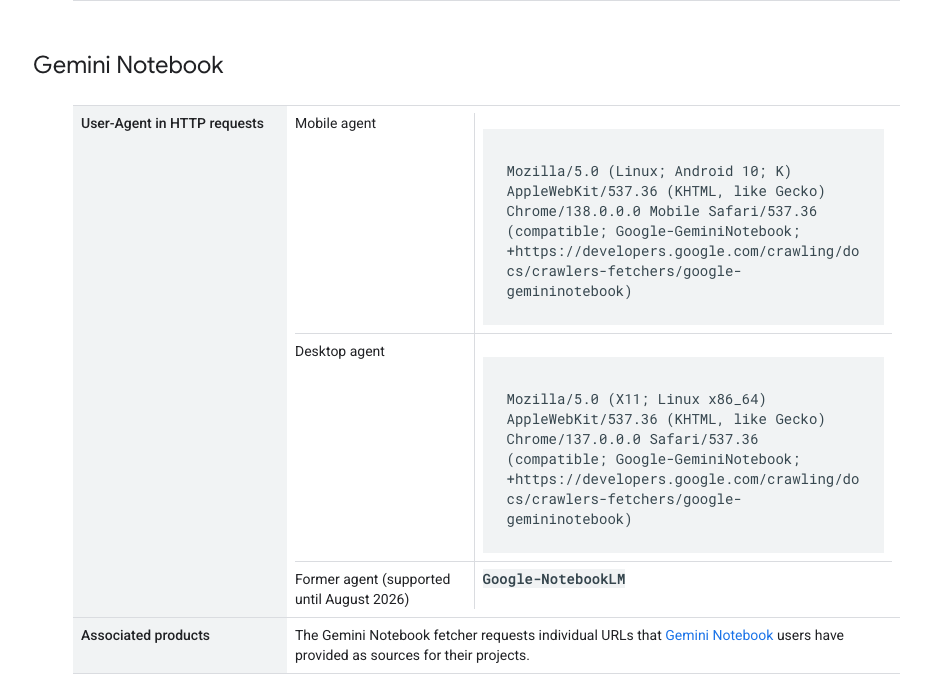
- The NotebookLM fetcher was renamed Google-GeminiNotebook on July 17, 2026; the old string dies around August 2026.
- It is a user-triggered fetcher, so it ignores robots.txt by design. A Disallow rule for it is silently inert.
- Discover Sources scrapes up to 10 articles per query and returns an AI summary with zero referral traffic.
- Control lives at the firewall, .htaccess, and IP-range layer, not in robots.txt.
- Blocking ≠ protection. For most B2B and thought-leadership sites, being cited beats being invisible.
Gemini Notebook's fetcher ignores robots.txt by design. Here is the rename deadline, the zero-referral Discover Sources risk, and the controls that actually work. The goal is not to chase every AI tool. The goal is to build a useful marketing system that a real team can understand, repeat, and improve.
What actually changed in July 2026?
Two things landed a day apart, and only one of them is operationally new. On July 16, 2026, Google rebranded NotebookLM to Gemini Notebook and folded it deeper into the Gemini ecosystem, with planned integration into Search's AI Mode. On July 17, Google's crawling documentation changelog renamed the fetcher's user agent from Google-NotebookLM to Google-GeminiNotebook, with the legacy string supported only through a transition window reported as lasting until around August 2026. No specific day has been published.
The fetcher itself is not new. Google first documented Google-NotebookLM as a user-triggered fetcher in October 2025, roughly nine months before the rename. Its behavior (fetching only URLs a user's action requests, ignoring robots.txt) is identical under the new name. As Search Engine Journal put it, 'Gemini Notebook is the exact same thing. There is no change to how it works or what it does.' What changes is visibility: a product now wired into the Gemini app and AI Mode will route more research sessions, and therefore more fetches, through your content.
The failure mode nobody sees coming: if you blocked the fetcher after October 2025, your rule matches the literal string Google-NotebookLM. Once traffic fully moves to the new name, that rule stops matching anything. Not because Google removed the fetcher, but because the fetcher renamed itself past your pattern.
| Phase | Date | What happened | Operator action | Source |
|---|---|---|---|---|
| Fetcher documented | October 2025 | Google-NotebookLM enters user-triggered fetcher docs | Add UA to log queries | [1] |
| Product rebrand | July 16, 2026 | NotebookLM becomes Gemini Notebook | Expect fetch volume to grow with adoption | [1] |
| UA rename | July 17, 2026 | Google-NotebookLM → Google-GeminiNotebook | Update firewall, .htaccess, and log queries to match both strings | [1][2] |
| Legacy UA sunset | ~August 2026 | Old string stops being supported | Confirm dual-string rules are live before the window closes | [1] |
Why doesn't robots.txt work on this fetcher?
Google sorts its bots into classes, and the class decides whether robots.txt applies. Per the official documentation, 'user-triggered fetchers are initiated by users to perform a fetching function within a Google product,' and because each fetch answers a specific user request, these fetchers 'generally ignore robots.txt rules.' The logic: a person pasted the URL or asked for sources, so the robots exclusion protocol, written for autonomous crawlers, does not govern it.
The practical consequence trips up experienced operators. A robots.txt directive targeting this user agent is not rejected, logged, or errored. It is simply never read. A rule like 'User-agent: Google-GeminiNotebook / Disallow: /' does nothing at all.
The narrow claim matters: robots.txt is not broken. It still fully governs autonomous crawlers like Googlebot, and Google-Extended remains the documented opt-out for AI-training use of your content. What this post covers is the class of Google bots that the robots.txt layer cannot reach, and Gemini Notebook's fetcher is the highest-traffic member of it right now.
The mental-model fix: stop thinking of robots.txt as the bot-control lever. It is one lever that binds one class of bots. Autonomous crawlers read it. User-triggered fetchers, by Google's explicit design, do not. Controls for the second class live one layer down the stack: firewall, server config, IP ranges.

What is Discover Sources, and why is it the real risk?
Both of Gemini Notebook's fetch paths use the same Google-GeminiNotebook user agent, but they carry very different risk profiles, and conflating them leads to bad blocking decisions. The classic path is a manual source add: a user pastes your URL into a notebook, the fetcher retrieves that one page, and the user works with content they deliberately chose. That is close kin to a person reading your page with an AI notepad.
Discover Sources is different. The user types a topic, and the feature scrapes up to 10 articles for that query, then produces an AI summary with no referral traffic back to any of the sources. The user never curates the URL list and does not necessarily see which pages were fetched before the summary lands. An entire research session can run on your reporting and your analysis without a single visit registering in your analytics.
Search Engine Journal flags a second-order risk worth naming, and attributing, precisely: content ingested this way can be repurposed by users into Audio Overviews and Video Overviews, formats Gemini Notebook has long supported, without attribution back to the original site, and if those derivative assets are republished, they could compete with the source in search. That scrape-summarize-remix-republish chain is SEJ's risk framing, not a Google statement. But the underlying mechanics it rests on (10 sources per query, zero referrals, built-in derivative formats) are documented product behavior.
The honest counterweight: this is also how modern research gets done, and being one of the 10 sources a strategist's briefing draws on has real influence value even when no click follows. Google states the product reaches 30 million-plus users and 600,000-plus organizations.
| Fetch path | Trigger | Referral traffic | Risk profile | Source |
|---|---|---|---|---|
| Manual source add | User pastes a specific URL | Possible, user knows your brand | Lower | [1][2] |
| Discover Sources | User types a topic query | Zero, up to 10 articles summarized | Higher | [1] |
Which Google agents actually obey robots.txt?
The coverage of this rename treats Gemini Notebook in isolation. The more useful view is the category: which Google agents read robots.txt, and which are exempt by class. Google now operates roughly ten agents that your robots.txt file cannot govern, and the AI-era additions (Gemini Notebook's fetcher, Google-Agent) are the ones fetching editorial content specifically.
The first group reads and obeys robots.txt. These are the crawlers and control tokens you already know: Googlebot, which runs autonomous crawls for Search and is controlled with robots.txt Disallow rules, and Google-Extended, the AI-training opt-out token controlled with a robots.txt User-agent rule.
The second group ignores robots.txt by class. None of these fetchers ever read the file, so the only working controls sit at the firewall, server-config, or IP-range layer. Read that second table as a category and the strategic picture sharpens. Each new user-facing AI surface Google ships arrives as a user-triggered fetcher, robots.txt-exempt by classification, and the control burden shifts one layer down the stack. It moves from a text file any marketer can edit to firewall and server configuration that many marketing teams cannot touch without engineering support.
| Agent | Trigger | How to control |
|---|---|---|
| Google-GeminiNotebook (legacy: Google-NotebookLM, to ~Aug 2026) | User adds source / Discover Sources query | Firewall / .htaccess UA rule, IP-range block |
| Google-Agent | User-directed agent task | Firewall / .htaccess UA rule, IP-range block |
| FeedFetcher-Google | User subscribes to a feed | Firewall / .htaccess UA rule, IP-range block |
| Google-Read-Aloud | User requests text-to-speech | Firewall / .htaccess UA rule, IP-range block |
| Google-Pinpoint | User uploads / queries a collection | Firewall / .htaccess UA rule, IP-range block |
| GoogleProducer | Publisher Center action | Firewall / .htaccess UA rule, IP-range block |
| Google-CWS, GoogleMessages, Site-Verification | Store listing / link preview / ownership check | Firewall rules (blocking Site-Verification breaks Search Console) |
How do you actually block or control it?
One scoping note first: this section is about controlling one robots.txt-exempt fetcher class. The broader policy question (which AI crawlers to allow for training versus search citations, and how robots.txt and llms.txt fit together) is a different decision layer. Everything below exists because this fetcher class reads none of those directives.
Option 1: .htaccess or server-config UA block. .htaccess is a settings file on Apache-family web hosting that lets you set rules for how the server responds to requests. The most accessible control here. 'Match the UA substring' just means: look at the name tag on the incoming request, and if it contains your target text (not an exact full-line match), block it. 'Return 403' means the server refuses with a 'Forbidden' response instead of serving the page. During the transition window, match both strings: RewriteEngine On / RewriteCond %{HTTP_USER_AGENT} (Google-GeminiNotebook|Google-NotebookLM) [NC] / RewriteRule .* - [F,L].
In plain terms, that reads: 'If the request's name tag contains Google-GeminiNotebook or Google-NotebookLM (case-insensitive), stop and return Forbidden.' On nginx or at a CDN/WAF layer (a WAF is a Web Application Firewall, the security filter sitting in front of your site at providers like Cloudflare), the equivalent is a 'user-agent-contains' condition returning 403. Same logic, different syntax. If you are on managed hosting (Shopify, Webflow, Squarespace), you usually cannot touch this layer yourself; you would set it at your CDN or ask your host.
Option 2: IP-range blocking. An IP range is the set of network addresses a company's servers send from. User-agent strings are self-reported, and anyone can spoof Google-GeminiNotebook in a request header. For verification or harder enforcement, Google publishes the IP ranges its fetchers operate from as JSON files. A firewall rule keyed to those published ranges blocks the traffic regardless of what name tag it claims, at the cost of maintaining the range list as Google updates it.
Option 3: Web Bot Auth. Google's documentation points to the experimental Web Bot Auth protocol, which uses cryptographic signatures to prove a bot is who it says it is, rather than trusting a name tag anyone can fake. It is early and not a practical dependency for most sites in 2026, but it signals where this is heading: verifiable bot identity at the request layer, because self-declared name tags were never a security boundary.
What not to bother with: robots.txt directives aimed at this UA (never read), meta robots tags (those are indexing instructions in a page's HTML; the fetcher is not indexing your page, so they are beside the point), and blanket Googlebot blocks (which take your search visibility down with them).
A UA-string block is a courtesy barrier, not a security control. It stops the documented fetcher, which honestly identifies itself, and nothing that lies about its name tag. That is usually the right trade here: the goal is controlling a known Google product's access, not defending against adversarial scrapers. For the latter, you need the IP-range and WAF-behavioral layer.
Should you block it at all?
Now the strategic question, because the technical ability to block does not make blocking right. The calculus differs sharply by business model, and blocking a research tool that 30 million-plus people use to build briefings and study guides is not a free action. Being among the sources an AI summary draws on is a form of reach, even at zero referrals. Being absent from it is invisibility, not protection.
A quick gloss on 'renders server-side' for the gated row: a fetcher sees what any logged-out request sees. If your paywall locks content in the browser (JavaScript hides it after load), the full text may still sit in the initial HTML the fetcher receives, meaning it can read 'paid' content for free. Server-side rendering means the locked content is never sent unless the request is authenticated. Check which one your paywall does before assuming you are protected.
This is the AEO tradeoff in its purest form, and it is the same call I walk through in how to get cited by AI search engines. If your business model depends on being cited, a hard block on a research-class fetcher is working against yourself. If your business model depends on pageviews or a paywall, an allow-by-default posture is a leak. There is no universal right answer, only the answer that matches how you make money.
The projection to plan around: the user-triggered fetcher class grows. Gemini Notebook is being wired into the Gemini app and Search's AI Mode, Google-Agent already sits in the same exempt category, and every agentic product across the industry has the same architectural excuse (a human asked, so robots.txt does not apply). By 2027, access control for content sites will look less like a robots.txt file and more like a firewall policy: identity-verified bots, published IP ranges, per-class allow and deny decisions maintained at the CDN.
| Business model | The reality | Posture | Source |
|---|---|---|---|
| Ad-supported publisher | Zero-referral summarization converts your reporting into someone else's research session with no monetizable visit | Lean block, implement against both UA strings now | [1] |
| B2B / thought leadership | Your content exists to shape decisions, and buyer research increasingly happens inside AI notebooks | Lean allow, make your pages the most citable in the niche | [1] |
| Premium / gated content | A robots.txt-exempt fetcher summarizing paid content for free is direct value leakage | Block, enforced hard at firewall + IP layer; confirm paywall renders server-side | [1] |
| Most other sites | Fetch volume may be negligible today | Log both UA strings, then decide from data | [1] |
What should you do this week?
Three moves, in order. Do them before the August transition window closes.
The larger signal is the one worth sitting with. As AI products reframe fetching as something a user asked for, the robots exclusion protocol quietly shrinks from the web's access-control standard to one lever among several. The sites that navigate the next two years well will be the ones that treated that shift as an infrastructure project: measured first, decided per bot class, and kept their rules current through renames like this one.
Automate the repeat. Review the risk. And know which lever actually reaches the bot you're trying to control.
- Update every UA-keyed rule and log query to match both strings: Google-GeminiNotebook and Google-NotebookLM. If your log dashboards only track the old string, your bot-traffic reporting develops a quiet gap exactly when the trend line gets interesting.
- Measure before you decide. Your access logs are the record your web server keeps of every request it receives, including the name tag each one wore. Search those logs for both strings and quantify actual fetch volume. Most hosting dashboards or a tool like GoAccess can surface this without you touching a command line. Many sites will find the volume negligible today; the blocking decision can wait for data.
- Decide your posture on Discover Sources by business model, not reflex. Zero-referral, 10-articles-per-query summarization is the feature that matters. Block it if pageviews or a paywall fund you. Allow it if influence and citations fund you.
FAQs
Questions this resource answers
What is the Google-GeminiNotebook user agent?
+
Google-GeminiNotebook is the user agent of the fetcher behind Gemini Notebook, Google's AI research tool (formerly NotebookLM). When a user adds a URL as a source or runs a Discover Sources query, this agent fetches the pages involved. Google renamed it from Google-NotebookLM on July 17, 2026, as part of the product rebrand. Because Google documents platform-specific variants of the string, log queries and firewall rules should match the Google-GeminiNotebook substring rather than one exact UA line.
Does Gemini Notebook's fetcher really ignore robots.txt?
+
Yes, by documented design. Google's crawling documentation states that user-triggered fetchers 'generally ignore robots.txt rules' because each fetch answers a specific user request. A Disallow rule for this user agent is silently inert, never read, no error. robots.txt still governs autonomous crawlers like Googlebot and the Google-Extended AI-training token, just not this fetcher class.
When does the old Google-NotebookLM user agent stop working?
+
Google says it will support the legacy Google-NotebookLM value through a transition window reported as lasting until around August 2026, with no specific cutoff day published. If your firewall, .htaccess, or log queries match only the old string, they will silently stop matching once traffic fully moves to Google-GeminiNotebook. Update rules to match both strings now.
Will blocking Google-GeminiNotebook hurt my Google rankings?
+
No. This fetcher is not Googlebot and has no role in Search indexing or ranking. Blocking it only affects Gemini Notebook's ability to fetch your pages as research sources. The risk is not a ranking drop. It is losing citation presence inside a research tool used by 30 million-plus people, which is a business-model decision, not an SEO penalty.
What is the difference between Discover Sources and adding a source manually?
+
A manual source add fetches one URL the user deliberately pasted, closer to a reader with an AI notepad. Discover Sources is higher-risk: the user types a topic, and the feature scrapes up to 10 articles and returns an AI summary with zero referral traffic, without the user curating or necessarily seeing the URLs first. Both use the same Google-GeminiNotebook user agent, so you cannot block one and allow the other at the UA layer.
Free kit
If this exposed a gap in how your site handles AI crawlers and fetchers, the Agent-Ready Website Kit gives you the crawl rules, metadata, and access-layer markup that actually matter, before the next rename ships past your pattern. Get the Agent-Ready Website Kit→
One useful AI tool a week
Short notes. Practical systems. No daily emails.