The short version
An agent-ready site is one an AI agent can read, navigate, and act on, not just one that ranks. Google's new experimental Lighthouse "agentic browsing" report (in Chrome Canary) checks four things: a well-formed accessibility tree, WebMCP tool coverage, an llms.txt file, and layout stability. Most of the web fails WebMCP today, and even Google's own page does not fully pass. Start with the boring web basics: semantic buttons, real links, labeled forms, and a layout that does not jump.
- Agent-ready is about being usable, not just findable. Search gets you ranked. Agent-readiness gets you used.
- Run the agentic Lighthouse report in Chrome Canary to see exactly what to fix first.
- llms.txt is not a search ranking file. It is an instruction file for agents acting on your site at inference time.
- Fix accessibility and layout stability before WebMCP. They help humans and agents at the same time.
Google's experimental Lighthouse agentic browsing report scores your site on whether AI agents can read, navigate, and act on it. Here is what it checks and how to pass. The goal is not to chase every AI tool. The goal is to build a useful marketing system that a real team can understand, repeat, and improve.
What agent-ready actually means
Your website has a new kind of visitor. Not a person, not a search crawler: an AI agent trying to use your site on someone's behalf. It books the call, fills the form, pulls the data, buys the thing.
Agents do not browse like people. They combine up to three signals to understand a page: the screenshot (what is visually present), the HTML/DOM (how the page is structured underneath), and the accessibility tree (the functional map of roles, names, states, and actions). If an agent cannot tell what is clickable or what an action does, it stalls, the same way a person would on a broken page, except the agent just leaves.
Here is the shift most marketers are about to miss. SEO got you found. AEO got you cited. Agent-readiness gets you used. Three different games. In the agentic web, the reason a human opens your site is to accomplish something. If their agent cannot operate it, and you are not a source they can only get from you, you become skippable.
Google's new Lighthouse agentic browsing report
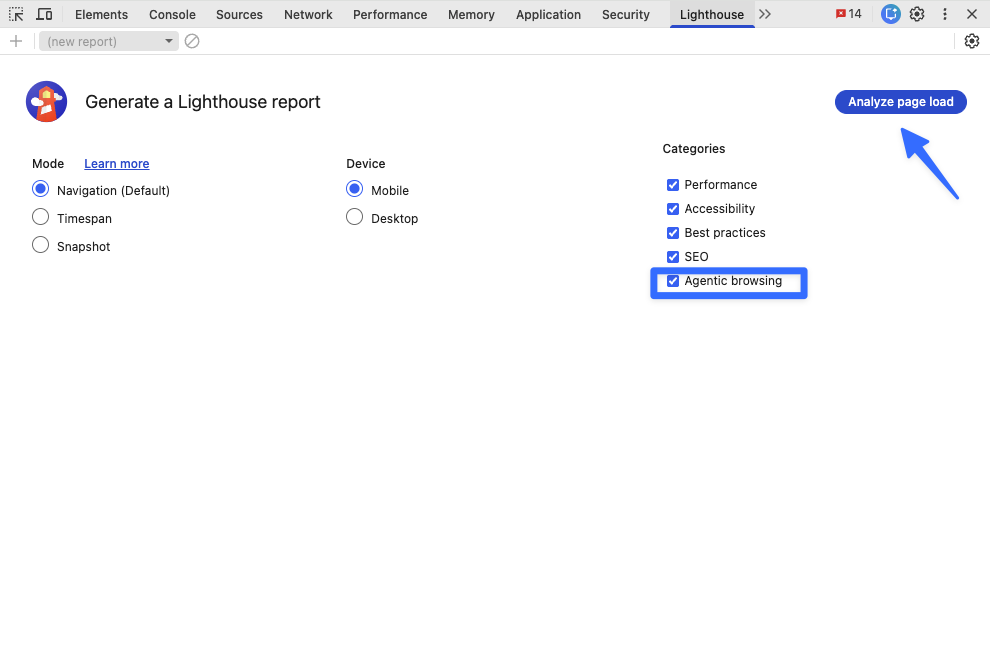
Google shipped an experimental "agentic browsing" category inside Lighthouse, the same tool you have used for page speed. You run it in Chrome Canary today: right-click any page, Inspect, open the Lighthouse tab, check "Agentic browsing," and Analyze.
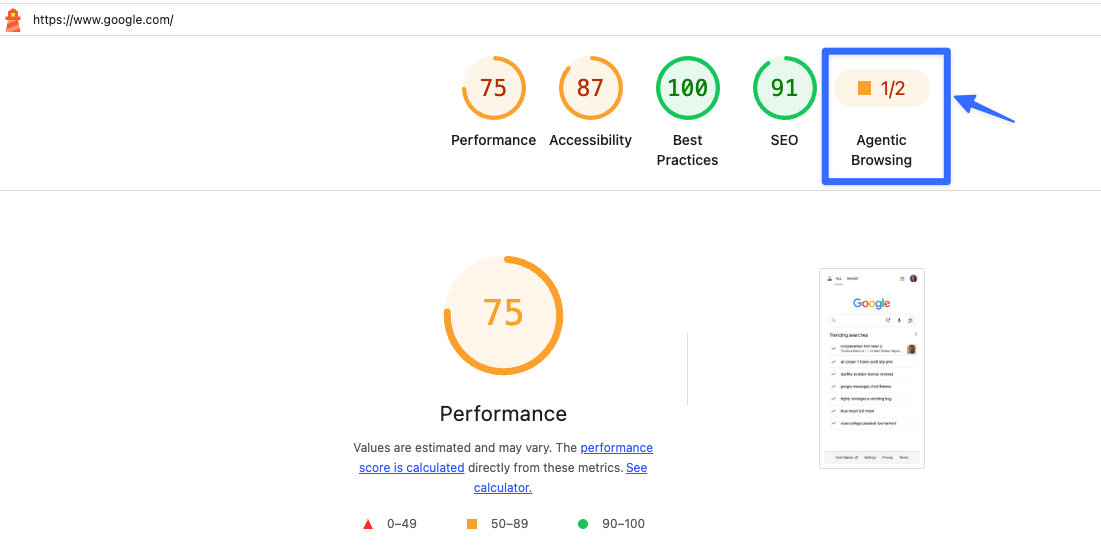
It does not hand you a 0-100 score like Performance does. It shows a ratio: how many agent-readiness checks your site passes, warns, or fails. One telling detail: run it on Google's own Lighthouse page and it does not fully pass. Most of the web is in the same boat.
What it looks at: whether your accessibility tree is well-formed, whether WebMCP tools are present, registered, and correctly described, whether your llms.txt follows the format, plus core signals like cumulative layout shift that quietly break agent actions.
How agents see your page
The accessibility tree was built for screen readers, but it is now the map agents use to find interactive elements: roles, names, states, actions. That makes a few common patterns quietly dangerous for agents:
A button that looks clickable but is really a styled div, invisible as an action. A form with no labels, so the agent cannot tell what each field wants. An action hidden from the tree: present visually, absent functionally. A layout that shifts after load, so the agent clicks where the button was and triggers the wrong thing.
None of this is exotic. It is accessibility hygiene that now doubles as agent-readiness work.
WebMCP: teaching agents to use your tools
WebMCP is a proposed web standard for exposing structured tools to AI agents. If your site has forms, calculators, bookings, filters, dashboards, or workflows, agents need more than pixels to use them reliably.
There are two flavors. Declarative is the easy one: you wrap your existing form so an agent knows what it does and what inputs it needs. Imperative is richer. It lets an agent and your site talk back and forth, closer to agent-to-agent interaction. Either way the goal is the same: stop making agents guess. Expose what the tool does, define the required inputs, and let the browser understand and register the action so it can be triggered directly instead of by simulating a mouse.
The honest caveat: if your site is purely informational and not something people do things on, WebMCP matters less right now. Earn the basics first.
The llms.txt nuance everyone is getting wrong
A few days before this report, Google said you do not need an llms.txt file (or markdown twins of your pages) to be visible in AI Search. That is true, for search. This is not about search.
llms.txt is for agents using your site at inference time. It is a markdown file (at least one H1) that tells an agent what your site does and how to navigate it, like robots.txt but for instruction rather than permission. Useful when an agent needs to act on your site, not when you are chasing a ranking.
One risk worth naming: maintaining a markdown twin of every page invites drift and even cloaking, where the agent version and the human version say different things. Add llms.txt where it solves a real agent task. Do not generate it preemptively to look modern.
Your agent-readiness checklist
1. Run the agentic Lighthouse report in Chrome Canary and read the pass/warn/fail list.
2. Fix cumulative layout shift and use real, semantic elements. Buttons are buttons, links are links.
3. Make the accessibility tree well-formed: labeled forms, correct ARIA roles, visible actions.
4. Add WebMCP only where agents act on real tools, then register and schema them properly.
5. Add llms.txt where it helps an agent finish a task, not as decoration.
6. Measure the one thing that matters: can an agent complete your top task end-to-end?
The early edge is not "AI content." It is making your site usable by the systems people are starting to delegate work to. Findable does not equal usable.
FAQs
Questions this resource answers
Do I need an llms.txt file for Google Search?
+
No. Google has said you do not need llms.txt or markdown twins for AI Search visibility. llms.txt is for agents acting on your site at inference time, a different context from ranking.
How do I run the agentic Lighthouse report?
+
Install Chrome Canary, right-click any page, Inspect, Lighthouse tab, check "Agentic browsing," Analyze page load. You get a pass/warn/fail breakdown instead of a 0-100 score.
Does my site need WebMCP?
+
Only if people use your site to do things: forms, bookings, calculators, dashboards. A purely informational page benefits more from a clean accessibility tree and stable layout than from WebMCP today.
Free kit
The 4-check audit, the fix list, a copy-paste llms.txt template, and a WebMCP decision tree. Run it on your site this afternoon. Get the free kit→
One useful AI tool a week
Short notes. Practical systems. No daily emails.